How I Made My Static Website Form Send Real Email
How I connected a static website form to a verified inbox using a small Cloudflare Worker, Turnstile verification, and an Email Service binding.
 Mohammad Afzal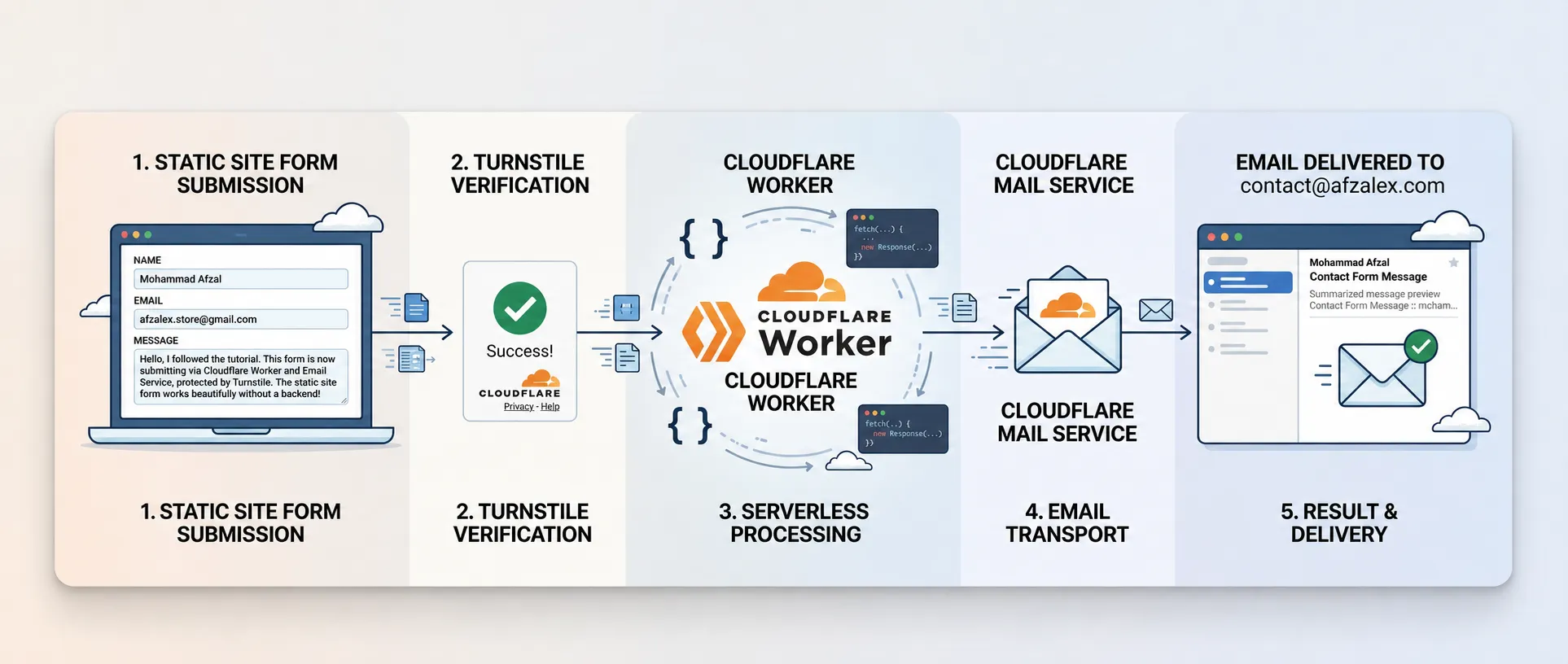
A website form becomes useful only when its submissions reach somebody.
That form might be labelled Contact us, Send an enquiry, Report a problem, Submit a complaint, or Request a callback. The labels change, but the delivery problem is the same: a public browser needs to pass untrusted input to a trusted backend, and the backend needs to put an understandable notification in the right inbox.
My Astro blog is statically generated and hosted without an application server. I wanted its contact form to deliver messages to Gmail without adding a paid form provider or exposing mail credentials in the browser.
The setup that worked uses:
Website form
  - Cloudflare Turnstile
  - Cloudflare Worker
  - Cloudflare Email Service binding
  - verified Gmail destination
The Worker is the important boundary. It decides which website may submit, validates the fields, verifies Turnstile, fixes the sender and recipient, and sends the message.
Requirements before starting
This article begins after a few account-level pieces are ready:
- A domain managed through Cloudflare. The sender address must belong to a domain onboarded to Cloudflare Email Service.
- Email Routing enabled. Cloudflare requires at least one verified destination address before a Worker email binding can send to it.
- A verified destination inbox. This is the real mailbox where notifications will arrive, such as a Gmail address.
- A Turnstile widget. The frontend needs its public site key, while the Worker needs the secret.
- A web form. It needs at least a name, reply address, and message, although the same pattern works for order references, complaint categories, phone numbers, and similar fields.
I covered the Turnstile setup separately in Cloudflare Turnstile: A Smarter, Free Alternative to CAPTCHA. That article explains why the visible widget and server-side Siteverify call are both necessary.
Cloudflare Email Routing keeps verified destinations under:
Compute > Email Service > Email Routing > Destination Addresses
I had already verified the Gmail inbox that would receive the form notifications.
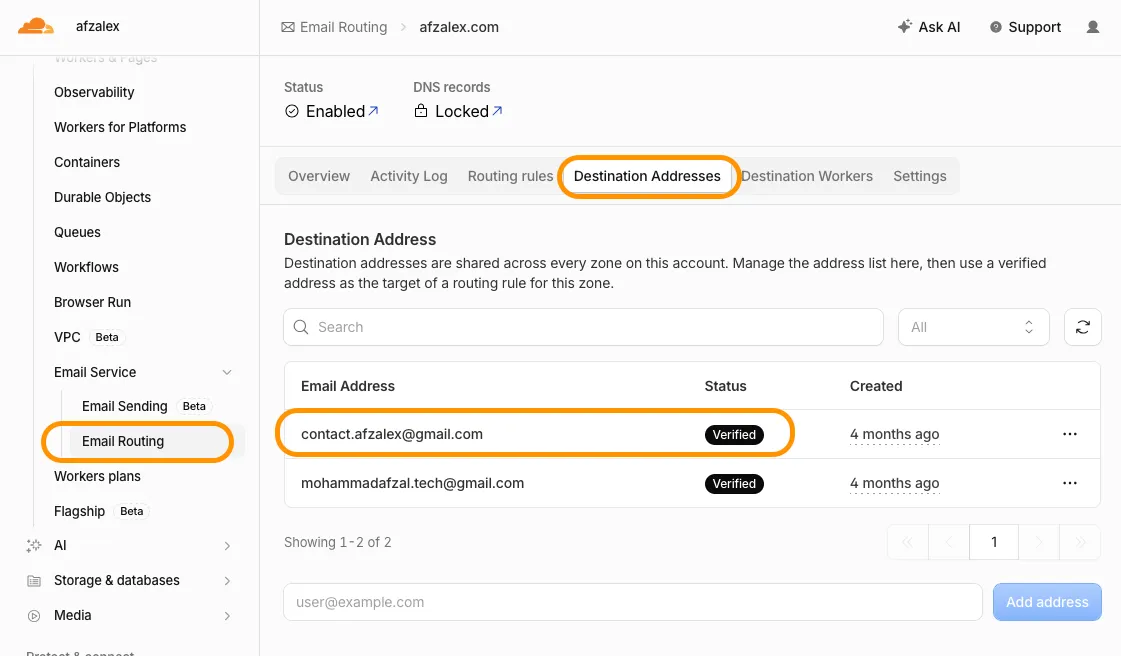
Verification matters for both security and pricing. A Worker email binding with no recipient allowlist can send only to verified destination addresses in the account. Cloudflare’s current pricing also makes these sends free, including when the account is using only Email Routing.
Create the Worker endpoint
Because the website is static, I created a small Cloudflare Worker to act as its form endpoint:
Compute > Workers & Pages > Create application > Start with Hello World
I named the Worker blog, which gave it this endpoint:
https://blog.afzalex.workers.devThe Worker does not host or render the blog. It has one narrow job: accept a valid form submission and turn it into an email.
Opening that URL directly sends a GET request. My Worker answers it with:
{
  "ok": false,
  "message": "Method not allowed."
}
That response is expected. The endpoint accepts form submissions with POST, plus OPTIONS for browser CORS preflight.
Add the Email Service binding
On the Worker’s Bindings tab, I selected:
Add binding
→ Email Service
I named the binding:
EMAIL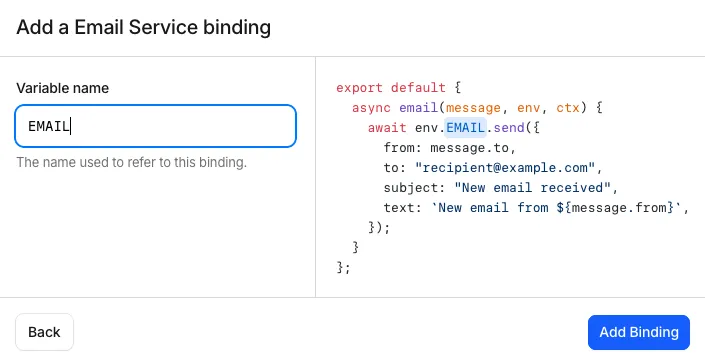
The name is not decorative. It becomes the property used by the Worker:
await env.EMAIL.send(...)Changing the dashboard name requires changing the code as well.
For a form that always delivers to one inbox, the recipient should never come from browser input. My code reads it from Worker configuration, and Cloudflare additionally restricts unrestricted bindings to verified destination addresses. A binding may also be configured with a fixed destination_address or an allowed_destination_addresses list for a tighter platform-level restriction.
Configure variables and the secret
Under Settings → Variables and secrets, I added:
CONTACT_FROM          contact@afzalex.com
CONTACT_TO            contact.afzalex@gmail.com
TURNSTILE_HOSTNAMES   blog.afzalex.com
TURNSTILE_SECRET      encrypted secret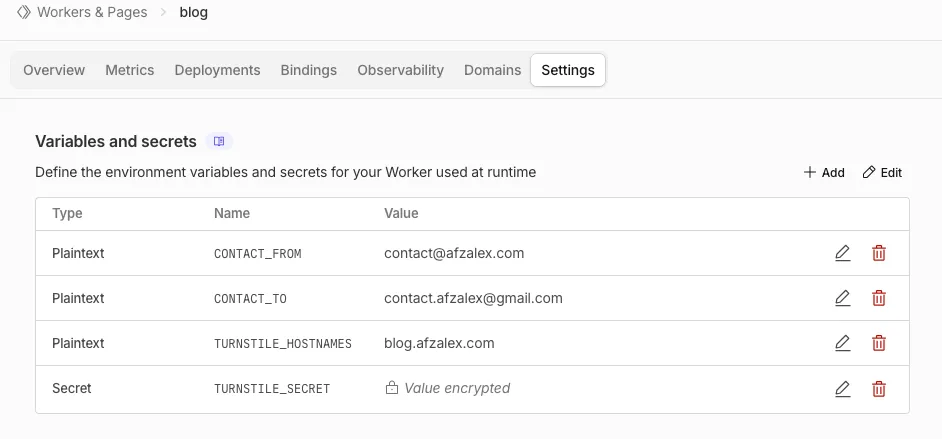
The first three values are ordinary runtime configuration. TURNSTILE_SECRET must be stored with the Secret type so the dashboard encrypts it and does not expose its value after saving.
Each value has a distinct purpose:
| Setting | Purpose |
|---|---|
CONTACT_FROM | A sender on my Cloudflare-onboarded domain |
CONTACT_TO | The fixed, verified inbox that receives notifications |
TURNSTILE_HOSTNAMES | The production website allowed to call the Worker |
TURNSTILE_SECRET | The private credential used for Siteverify |
The frontend receives neither CONTACT_TO nor TURNSTILE_SECRET. Visitors cannot choose a recipient, and they cannot verify their own Turnstile token.
Give the three email addresses different jobs
A form submission contains three email identities, and mixing them up causes security or deliverability problems:
From       contact@afzalex.com
To         contact.afzalex@gmail.com
Reply-To visitor@example.com- From is controlled by the Worker and belongs to the onboarded domain.
- To is controlled by the Worker and points to the verified destination.
- Reply-To comes from the validated form field.
I do not place the visitor’s address in From. Cloudflare has not verified that visitor’s domain, and pretending to send as somebody else’s address would conflict with modern email authentication. Reply-To expresses the real intention: the notification came from my website, but clicking Reply should address the person who filled in the form.
Validate before sending
The Worker rejects requests before email delivery when:
- the HTTP method is not
POST; - the browser origin is not an allowed HTTPS hostname;
- required Worker configuration is missing;
- the request is too large;
- a field is empty or longer than its limit;
- the reply address is malformed;
- the Turnstile token is missing, expired, invalid, or too large;
- Siteverify reports the wrong action or hostname.
The core ordering is deliberate:
Check request
- parse form
- validate fields
- verify Turnstile
- send email
- return success
The email call must remain after every validation gate:
const form = await request.formData();

const name = requiredText(form, "name", 100);
const email = requiredText(form, "email", 254);
const message = requiredText(form, "message", 5_000);
const token = form.get("cf-turnstile-response");

if (
  !name ||
  !email ||
  !validEmail(email) ||
  !message ||
  typeof token !== "string" ||
  !token
) {
  return Response.json(
    {
      ok: false,
      message: "Please complete every field and the security check.",
    },
    { status: 400 },
  );
}
The Worker then verifies the Turnstile token from the browser:
const verificationResponse = await fetch(
  "https://challenges.cloudflare.com/turnstile/v0/siteverify",
  {
    method: "POST",
    headers: {
      "Content-Type": "application/x-www-form-urlencoded",
    },
    body: new URLSearchParams({
      secret: env.TURNSTILE_SECRET,
      response: token,
      remoteip: request.headers.get("CF-Connecting-IP") || "",
    }),
  },
);

const result = await verificationResponse.json();

if (
  result.success !== true ||
  result.action !== "turnstile-spin-v2" ||
  result.hostname !== "blog.afzalex.com"
) {
  return Response.json(
    { ok: false, message: "The security check failed. Please try again." },
    { status: 403 },
  );
}
If the widget fails, the browser should stop before making the request. The Worker still performs its own check because browser JavaScript can be bypassed. A failed, missing, expired, or reused token must never reach env.EMAIL.send().
Build a useful notification
After validation and Siteverify succeed, the Worker sends a plain-text notification:
await env.EMAIL.send({
  to: env.CONTACT_TO,
  from: env.CONTACT_FROM,
  replyTo: email,
  subject: "New message from blog.afzalex.com",
  text: [
    "New contact-form message",
    "",
    `Name: ${name}`,
    `Email: ${email}`,
    `Received: ${new Date().toISOString()}`,
    "",
    "Message:",
    message,
  ].join("\n"),
});
Plain text is enough for this use case. It is easy to inspect, difficult to style deceptively, and avoids rendering arbitrary visitor HTML in the inbox.
For a complaint or support form, the same message could include fixed fields such as:
Category: Billing
Reference: INV-1042
Priority: Normal
Those values still need server-side validation. A dropdown in the browser is a convenience, not a trust boundary.
Connect the static form to the Worker
My Astro form points its action at the Worker:
<form
  action="https://blog.afzalex.workers.dev"
  method="post"
  data-contact-form
>
  <!-- labelled name, email, and message fields -->
  <!-- Turnstile widget -->
  <button type="submit">Send</button>
</form>
JavaScript submits FormData, which automatically contains the Turnstile-generated cf-turnstile-response field:
form.addEventListener("submit", async (event) => {
  event.preventDefault();

  const formData = new FormData(form);
  const token = formData.get("cf-turnstile-response");

  if (typeof token !== "string" || !token) {
    showStatus("Please complete the security check.");
    return;
  }

  const response = await fetch(form.action, {
    method: "POST",
    headers: { Accept: "application/json" },
    body: formData,
  });

  const result = await response.json();
  showStatus(result.message);
});
The real page also disables the button while sending, announces status through an aria-live region, resets the form after success, and resets Turnstile after every attempt so a retry receives a fresh token.
CORS should be narrow
The website and Worker use different origins:
Website   https://blog.afzalex.com
Worker    https://blog.afzalex.workers.dev
The Worker therefore returns:
Access-Control-Allow-Origin: https://blog.afzalex.com
Vary: Origin
It does not return Access-Control-Allow-Origin: *.
CORS is not a replacement for Turnstile or validation, but a narrow allowlist prevents ordinary browser pages on unrelated domains from using the endpoint. The same configured hostname is also checked against the hostname returned by Siteverify.
Test the whole path
I tested the production form rather than treating the green Turnstile check as proof of email delivery:
- Submit valid fields and a completed Turnstile challenge.
- Confirm that the page reports success only after the Worker returns
200. - Open the destination inbox and inspect the sender, visitor address, timestamp, and message.
- Select Reply and confirm that Gmail addresses the visitor from
Reply-To. - Check Cloudflare’s activity or sending logs for the delivery result.
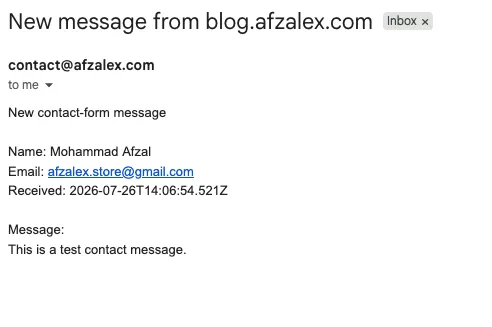
The final message arrived in Gmail from contact@afzalex.com, with the visitor’s submitted address preserved in the body and as the reply target.
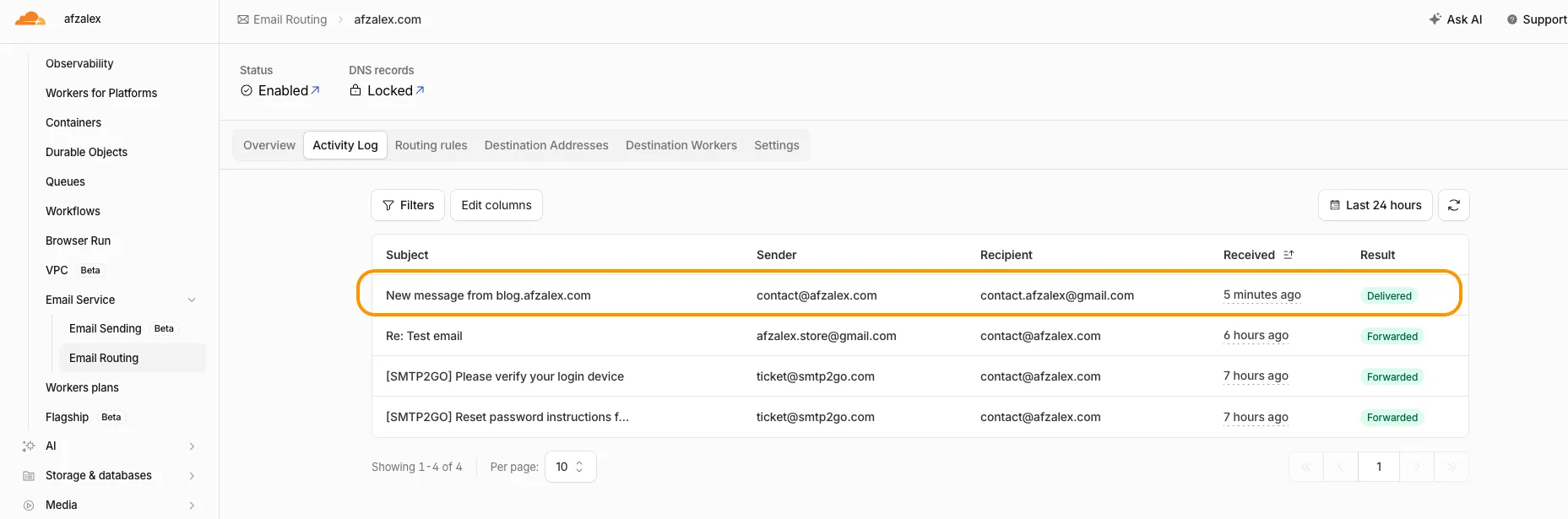
Cloudflare also recorded the Worker-generated message as Delivered to the verified destination.
I also tested failure paths: a direct GET, an unexpected origin, missing Turnstile data, an invalid reply address, and a failed Siteverify response. None of them called the email binding.
What is free, and what is not
Cloudflare currently allows a Worker to send to verified destination addresses free of charge on all plans, including accounts configured only for Email Routing. Those sends do not count against the arbitrary-recipient Email Sending quota.
That makes this fixed-inbox pattern a good fit:
Many website visitors
  → one protected Worker
  → one verified destination inbox
It does not mean the Worker can act as a free general-purpose mail server. Sending to arbitrary recipients is a different Email Sending capability with its own plan and quota. Cloudflare’s abuse controls and the normal Workers limits also still apply.
The form submission does not use Gmail’s sending quota and does not use SMTP2GO. Gmail is only the destination mailbox for this path. If I later reply from Gmail as contact@afzalex.com, that reply uses whichever SMTP service is configured for Gmail’s Send mail as feature.
Cloudflare documents the current details under Email Service pricing, send binding configuration, and the Workers email API.
A small backend with a clear responsibility
The finished system separates responsibilities cleanly:
- the static site collects and displays form state;
- Turnstile produces evidence about the browser interaction;
- the Worker verifies that evidence and validates untrusted fields;
- the Email Service binding delivers only after the checks pass;
- Gmail stores the notification and replies to the visitor.
That pattern is useful beyond a page named Contact. It can carry support requests, corrections, complaints, booking enquiries, feedback, and other low-volume website submissions.
The essential rule stays the same: the browser may request delivery, but only the backend may decide that a message is safe and valid enough to send.

Senior Staff Engineer writing about cloud systems, automation, product engineering, and the practical work of building reliable software.
Hook this up to your favourite commenting platform — Giscus, Disqus, or your own.
Continue reading

Running split DNS at home with dnsmasq
How to resolve the same hostname locally at home and through a public route outside, using dnsmasq on a Raspberry Pi.
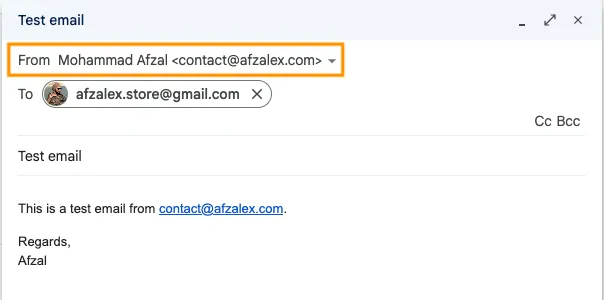
A professional email address on my own domain—for free
How I connected Cloudflare Email Routing, SMTP2GO, and Gmail so I could receive and send mail as contact@afzalex.com without paying for a hosted mailbox.
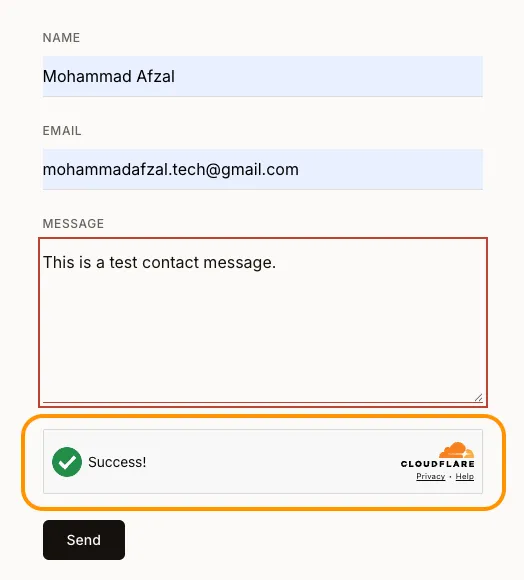
Cloudflare Turnstile: A Smarter, Free Alternative to CAPTCHA
How Turnstile protects web actions from automated abuse with less friction, and why its server-side verification matters as much as the visible widget.